Tips
Learn how to create WhatsApp stickers with the best apps:
Learn how to create your own WhatsApp stickers quickly and easily. Discover essential tools, simple editing techniques, and practical tips to personalize your conversations. Unleash your creativity and add a unique touch to your messages.
Advertisement
Create amazing stickers for WhatsApp with these apps!

WhatsApp has revolutionized the way we communicate, making conversations richer and more fun through the famous stickers. So, you need to know how to create these stickers for WhatsApp.
With a multitude of options available, many people want to customize their own creations.

So, in this article, we'll explore how apps for creating WhatsApp stickers work and present the best apps for you to dive into the world of creativity.
This way, you can create your own stickers and have fun in WhatsApp conversations.
How does an app for creating WhatsApp stickers work?

Before we delve into the apps, it's important to understand the basic workings of how these magical tools create personalized stickers.
In short, these apps allow you to transform your images or photos into unique stickers that can be shared with your WhatsApp contacts.
And the best part is that you don't need to be a graphic design expert to create your own stickers, as these platforms simplify the entire process.
Best apps for creating WhatsApp stickers:
Now that you understand how these apps work, it's time to discover which ones are best to start your creative journey. Therefore, we present the most popular apps for creating amazing WhatsApp stickers:
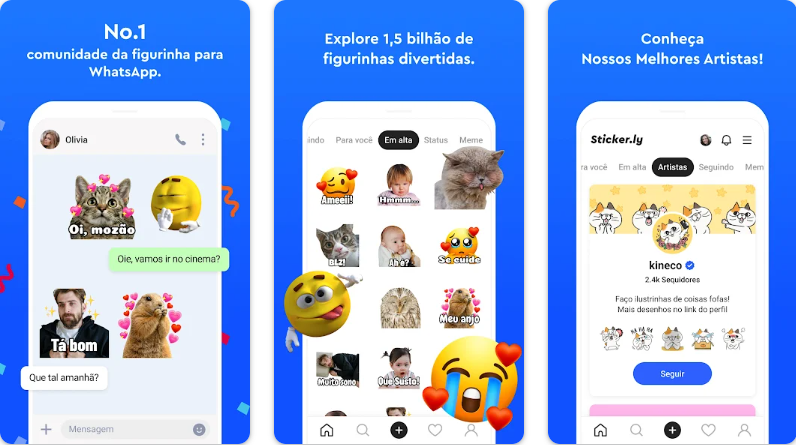
Sticker.ly
Sticker.ly is a versatile platform that allows you to create stickers from your photos and even videos. In addition, it offers a vast collection of ready-made stickers for you to explore.
My Sticker Maker
Simplicity and efficiency are the mottos of My Sticker Maker. This app is perfect for anyone who wants to create stickers quickly. Just select an image, crop it, and voilà – your sticker is ready.
Wemoji
Wemoji is a fun option for those who enjoy customization. It allows you to add text, emojis, and filters to your stickers, making them even more expressive.
Sticker Studio
If you're looking for advanced editing features, Sticker Studio is the right choice. After all, it offers a variety of editing tools, such as precise cropping and the ability to create high-quality stickers.
Sticker Maker
This app offers a perfect balance between simplicity and functionality. With Sticker Maker, you can create stickers in seconds and share them with your friends.
Tutorial for creating stickers for WhatsApp:
It's time to get down to business and create your own WhatsApp stickers. So, let's guide you step by step to ensure the process is easy and fun.
1. Open the App: After installing the app of your choice, open it. You will be greeted with a home screen that usually displays options such as “Create sticker” or “Get started”;
2: Select the Image: Tap the “Create sticker” option and then choose the image you want to turn into a sticker. Most apps allow you to select images from your photo gallery;
3: Crop the Image: After selecting the image, it's time to crop it. This is important to define the specific area of the image you want to use as a sticker;
4: Add Text or Emojis (Optional): If you want to add a personal touch to your stickers, many apps offer the option to insert text or emojis. This is great for creating stickers with personalized messages;
5: Save the Sticker: After cropping and customizing your image, tap the “Save” or “Create” option (names may vary depending on the app);
6: Add to WhatsApp: After creating your sticker, open the conversation where you want to send the sticker and access the sticker section.
Done! Finally, your personalized sticker is now ready to be shared with your friends and family on WhatsApp. This way, you can use it to express your emotions, tell stories, or simply add fun to your conversations.
Step by step: download the app

Creating stickers for WhatsApp is an amazing way to personalize your conversations and add a touch of fun to digital communication. So, here's how to download the app to access these stickers.
First, click the link below to be redirected to the app download page.
Or, if you prefer, you can choose the manual process below:
1. Access the App Store: The first step is to access the app store on your device;
2: Search for the App: Next, use the search bar in the app store to find the sticker-making app of your choice;
3: Select the App: After finding the desired app in the search results, tap the app icon to open the download page;
4: Install the App: On the app page, tap the “Install” or “Download” button.
Finally, you now have the sticker creation app installed and are ready to start creating your own personalized stickers for WhatsApp.
Trending Topics
Discover how to lose weight with the best diet apps.
Learn how to lose weight healthily using diet apps that will help you do it easily, practically, and healthily.
Keep Reading
Dr.Fone iOS: Recover lost photos and memories on your iPhone in minutes.
Recover your lost memories with Dr.Fone iOS. Restore photos, videos, and more directly from your iPhone or backup.
Keep Reading
Top 5: Best Movie and TV Series Apps for 2024
Browse exciting content, from gripping dramas to epic adventures, with the best series and movie apps.
Keep ReadingYou may also like
Discover the app to make your battery last longer.
See how to keep your phone's battery charged so you can take photos and use apps all day. Check out the app to make your battery last longer.
Keep Reading
Earn Shein discount coupons and save on your purchases.
Save on fashion: discover Shein discount coupons. Enjoy exclusive discounts to refresh your wardrobe in style.
Keep Reading
Take your eye exam online: use apps to test your vision.
Discover a new era in eye health with online eye exams. Take care of your vision in an innovative way using your mobile phone.
Keep Reading


